Instructions to compose a free "crossword"
HOW you can compose your "crossword" to install in your wall from the pieces of the artist Evan Deval. Please, visit the homepage www.evandeval.com/eng
Lets go your imagination and creativity !!
Pieces
The pieces, presented/displayed in this website,
are works of Evan Deval and correspond to made and sold
units. The sizes of the pieces change according to the type of series
and their measures are indicated in the web. The contents of the pieces
change in each order according to the criterion of the artist Evan
Deval. You choose the amount of pieces that you want and the
position of the set.
Wall
The pieces settle in your wall according to the
composition that you choose freely. In this website, there are examples
of walls (sizes are not conditional). Finally, You decide the measurement
of "crossword" that adjusts better in your space.
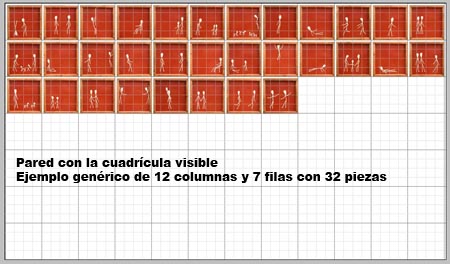
Note: In the web the grid is hidden
How
to create your own "crossword"
In this website you have a total of pieces to be
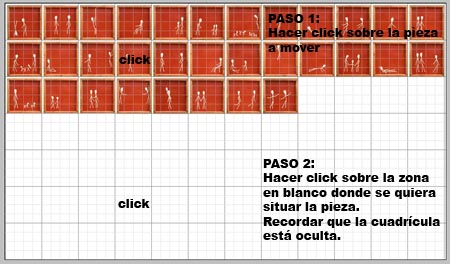
use. In order to move each piece you must click on the piece that you
want to move and later on click on the zone in target where you want to
locate. Attention: Nondrags!.
You can move so many pieces to compose your "crossword". Keep
the pieces that you do not want separated outside the composition.
Steps
1 and 2
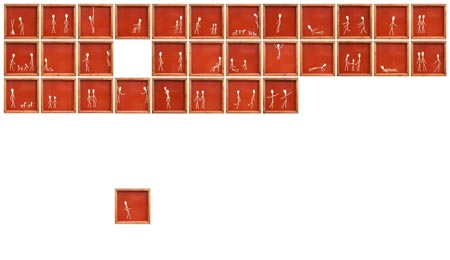
Obtained
result
Example
of "crossword" composed with 14 pieces of a
total of 32
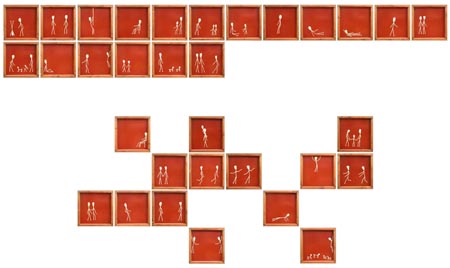
Observe: the not used pieces have been ordered in the
superior part
Saving
the composition
To save your final composition, please click in
the ImPan key of
the keyboard and next, open a WORD new document and go to EDITION >
PASTE. All the screen with the created composition has been pasted. Print
and Save the document and send it as attached file to:
admin@evandeval.com
For
any problem or consult, please contact us:
admin@evandeval.com